Follow us:


T4A GPS Africa Guide
Current Version: 26.10 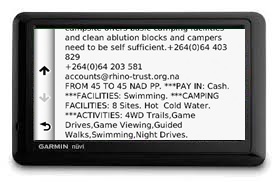
This guide is published in the format of a custom point of interest file for compatible Garmin GPS units, for SEARCH purposes.
The guide will add valuable additional information about camp sites, lodging and other attractions to your GPS which is normally not available on the GPS map.
It also enhances your search experience as we introduce categories which are specially designed for the self-drive tourist in Africa. Listings are fully searchable under Extras on your GPS.
The following categories are included on the T4A Africa Guide: Activities – things to do around you Attractions – things to see around you Border Control – this category makes it easy to find border control and immigrations offices Camping – the most complete camping guide in Africa with sub-categories Communications – where to buy airtime or get an internet connection Lodging – places offering a bed, divided into several categories Mountain Passes – hard to find on the normal map, now easy to find around you with additional information and photos for some Picnic Spots – on the road you want the nearest picnic spot, this category makes it easy to find them Protected Areas – national parks, game reserves with descriptions Shopping – several shopping subcategories are included for ease of access Travel Regions – find the major travel regions we use on our maps Towns – easy access to towns with loads of useful information where applicable Viewpoints – never easy to find on the map, now in a category of its own You will notice that some listings do not have any additional information associated with it.
This information is also available on your T4A GPS map, so why do we then include it on the GPS guide? Points of interest such as Picnic Spots, Border Controls or Viewpoints are not always easy to search for on your GPS map because they do not have their own categories assigned to them like for instance fuel stops or lodging. For this reason they are duplicated in the T4A GPS Africa Guide in order to make it easy to search for these very important places when you are driving in Africa.
Lodging and Camping categories include the well-researched Namibia, Botswana, Zambia and Zimbabwe guide book information, which contains rates, facilities and activities for each listing.
Note: different GPS units behave differently in how they display the icons of the POIs on the GPS screen - Some GPS units may display just a POI name, others may display an icon.
Where to find the T4A Africa Guide:
Activating the Africa Guide:
Accessing the Guide:
This Africa Guide can be accessed under "Extras" on your compatible Garmin Device. Follow the steps and screenshots further below.
Overview of this Guide:
This Africa Guide enables you to look up descriptions, contact details, rates, facilities and activities on offer for lodges and campsites in Africa directly on your GPS. Also included are searchable picnic sites and border control information, perfect for your next road trip.
You can also look up information on various attractions (eg. wine farms) and activities (eg. 4WD-trail) that exist as Points of Interests (POI) on our maps.
We've also included a "Communications" category: use this to find the nearest point selling airtime, offering internet access, or wireless, or where the nearest public phone is, or a good mobile reception spot.
Look out for the "Shopping" category: to help you find your nearest shop of choice, and the nearest place selling gas.
Please note that as from ver 19.05 we no longer include Photos in this guide.
For more information on this guide, please have a look this T4A Africa Guide Document.
Troubleshooting:
Our Africa Guide is not compatible with these unit/s:
- Old Nuvi 310 (it doesn't have an "Extras" feature in order to access the guide).
Photos not showing on the guide:
The Garmin Colorado GPS series was designed without the functionality to show photos in these files.
The Montana GPS also did not show any photos, but Garmin released a new software update in October 2011 (v3.60) which fixed this. This fix is available on the webupdater on the Garmin site at http://www8.garmin.com/support/collection.jsp?product=999-99999-27).
The Oregon 300 GPS: if no photos are shown, update to the latest firmware. Oct-11 this was v4.20. The latest software updates are available on the webupdater on the Garmin site at http://www8.garmin.com/support/collection.jsp?product=999-99999-27).
The GPS Unit switches off when accessing some POIs in the Africa Guide:
- Some newer GPS units, like the Nuvi 40, does not accept long text fields if built into the Africa Guide in a certain way, many older GPS units did not have this problem. As from version 12.05 this problem should no longer occur, as T4A has changed the way the Africa Guide is built wrt using fields for long strings of text etc. If you do experience this problem, please contact us, so that we can supply you with a later version of the Africa Guide.
Difficulty in accessing the information on the Africa Guide on the Garmin eTrex 20
The only way to access information on the Africa Guide is via a POI on the GPS map on your GPS unit.
Once you have chosen the POI you are interested in on your GPS, press the "menu" button on the side of the eTrex, and then scroll down and choose the option "Review Point" on your GPS screen...a photo and information will pop up if it is available for that particular point.
ACCESSING THE T4A Africa Guide: it will be available under 'Extras' on your compatible GARMIN GPS as follows:
This information can be accessed in various ways on your GPS depending on the Garmin Model you are using.
(Note: with some of the newer GPS models, this POI information is directly accessible from the maps view page etc.)
But for the older models, you can follow these steps:
Choose "Where To" on your GPS screen:
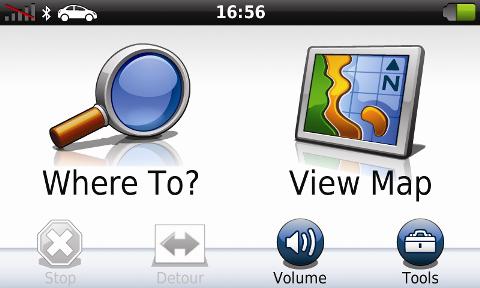
Then choose "Extras":
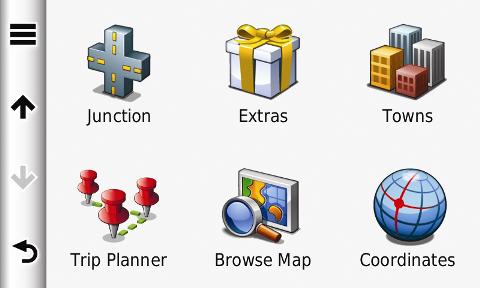
Then choose the "T4A Africa Guide":
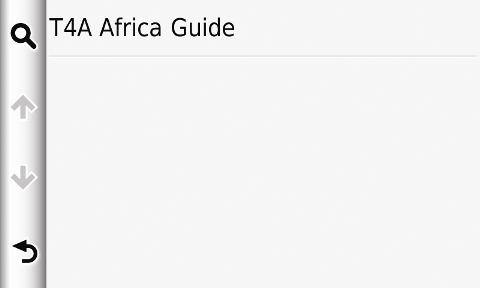
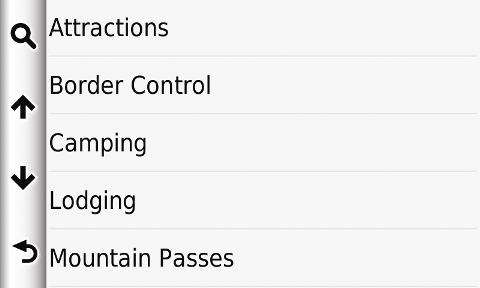
Then choose the category from the list you are interested in:
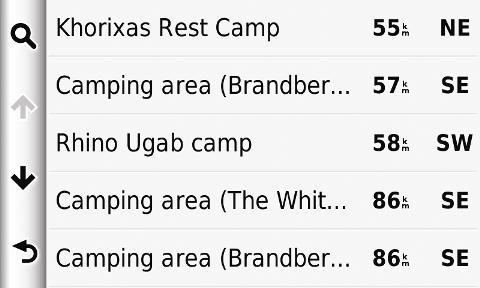
The points of interests (POIs) will be displayed in order of closest proximity to you:
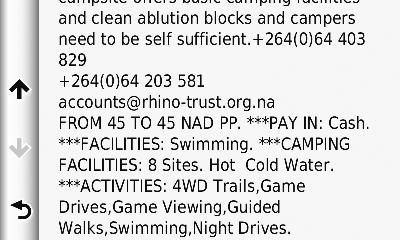
Choose the camp you are interested in, in order to view more detail (ie. photos are also displayed where available):
Then hit GO and Tracks4africa will navigate you to the place you are interested in.
Follow us on